Using the Facebook Pixel as a Product Source in Pixel Plus
The Facebook Pixel can be used to automatically feed products to your Meta (Facebook/Instagram) catalog — but only when all required product microdata is correctly implemented on your PrestaShop store.
The Pixel Plus module for PrestaShop simplifies this process by detecting and filling in missing microdata, and by ensuring the ViewContent event is triggered properly.
Follow the steps below to ensure your Pixel is ready to act as a product source.
✅ Step 1: Check if the Pixel is Eligible as a Product Source
Visit the Meta Events Manager, select your Pixel, and check if it's eligible as a product source.
- If it is eligible → This means your store's microdata is complete, and Facebook can read your product information directly from your pages.
- If it is not → You'll need to fix the missing or incorrect microdata on your product pages.
⏱️ Note: Facebook may take anywhere from a few hours to several days to validate your Pixel as a product source.
This depends on your site's traffic volume and how often Facebook bots are able to crawl your product pages.
Patience is recommended.
🔧 Fixing Microdata with Pixel Plus
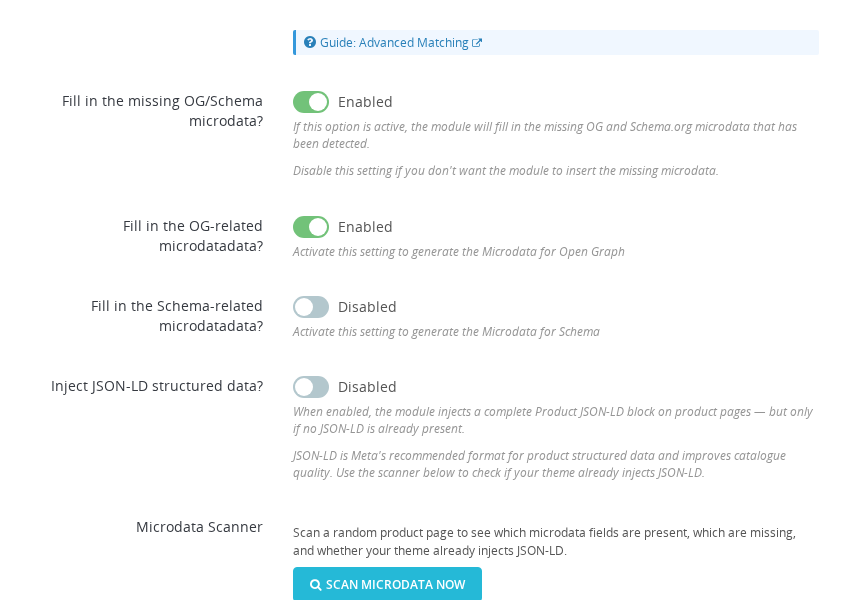
Go to the Microdata section of the Pixel Plus module to review and improve your store's product metadata.
Key options:
-
Fill in the missing microdata?
Automatically inserts missing Open Graph and Schema microdata for products. -
Fill in the OG-related microdata?
Adds Open Graph tags likeog:title,og:image,og:description, etc. -
Review Micro Data?
Run a one-time scan to detect missing or malformed data. The module will display what's missing below.When enabled, the module will automatically fill in any required tags according to Meta's standards.
You may see missing tags such as:
og
product:retailer_item_id
product:availability
schema
title
description
brand
price
priceCurrency
availability
Then, by enabling the mentioned option Fill in the OG-related microdata? the module will try to add the missing fields
The module can fill in the detected missing microdata, but it can't replace the existing one
🛠️ Customization Options
Pixel Plus also allows you to tailor the way the missing microdata is generated:
- Ignore cover image: Use the first image instead of the designated cover.
- Images limit: Limit the number of product images included in the feed.
🧪 Microdata Debugging Tool
To validate your product metadata manually, use Facebook's Microdata Debug Tool:
- Copy a product URL from your shop
- Open the Microdata Debug Tool
- Paste the product URL and run the test
If no red error messages are shown, your microdata is valid and the Pixel will be eligible as a product source soon.
✅ Step 2: Confirm the ViewContent Event Is Working
The ViewContent event is essential for Facebook to receive product information from each product page.
To check if it is triggered correctly:
- Open a product page
- Use the Meta Pixel Helper Chrome extension
- Look for the
ViewContentevent and check the parameters (product ID, price, etc.)
📌 The event must fire for Facebook to collect product data via the Pixel.
ℹ️ About Facebook's Event-Based Catalogues
When using the Pixel as a product source, Facebook builds your catalog based on:
- The microdata tags present in your product pages
- The
ViewContentevents triggered during visits
This is known as an event-based catalogue. It works well for many shops, but has some limitations:
- Products are only added when visited by a user
- Updates are not instant and although Facebook states that happens in 15 minutes, can take up to 48h in some cases
- Variants, stock levels, or localized data may be limited
💡 Need More Control? Try the Products Feed Module
If you need to:
- Export all products at once
- Include product combinations, quantities, custom fields, and categories
- Sync with Meta catalogs using a feed or scheduled cron job
Then we recommend the dedicated Products Feed module from Smart Modules for PrestaShop.
🔗 Get it from:
It offers full support for:
- Dynamic product ads
- Export all products in one go
- Multi-language catalogues
- Multi-country (currency) catalogues
- Variant and combination control
- Scheduled updates
- Facebook & Instagram product tagging
- Many other features...
✅ Final Checklist
| Task | Status |
|---|---|
| Pixel eligible as product source? | ✅ |
| Microdata complete (OG + Schema)? | ✅ |
ViewContent event working? | ✅ |
Once all conditions are met, Facebook will automatically begin populating your catalog using Pixel Plus.
How do I know if my pixel is eligible as a product source?
Open Meta Events Manager, select your Pixel, and check the eligibility status. If eligible, your microdata is complete and Facebook can read product data from your pages. If not eligible, fix missing or incorrect microdata using the Pixel Plus Microdata section.
What microdata fields are required for Facebook to accept my products?
The required fields include og:title, og:image, og:url, product price amount, product price currency, and product availability. Pixel Plus can detect and automatically fill missing fields, but it cannot replace incorrect values already generated by your theme.
Why is the ViewContent event essential for the pixel-based catalogue?
Facebook builds the catalogue by combining ViewContent event data with the microdata found on the same product page. Without ViewContent firing on product pages, Facebook does not receive the signal to crawl and add those products.
What are the limitations of using the pixel as a product source compared to a dedicated feed?
Products are only added when visited by a user, updates are not instant and can take up to 48 hours, and variant or localized data may be limited. For full control over all products, combinations, and scheduled updates, the Products Feed module is recommended.
Can I use the pixel catalogue for Instagram shopping as well?
Yes. Once the Facebook catalogue is populated from the pixel, it can be connected to both Facebook and Instagram shops in Meta Commerce Manager. The same microdata and ViewContent event requirements apply.
Need help testing or debugging your events? 👉 See: How to Test Facebook Events with Pixel Helper and CAPI Logs