Deferred Pixel Loading
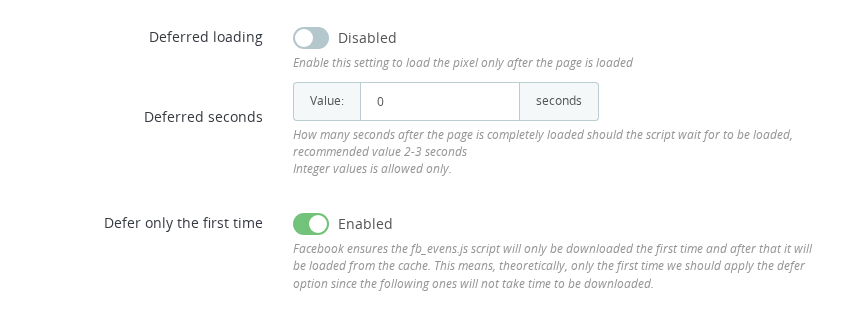
By default, Pixel Plus initialises the Meta Pixel script as soon as the page starts rendering. Deferred Pixel Loading changes this: the pixel script is not initialised until the page has fully loaded (document.readyState === "complete"), and optionally for an additional number of seconds after that. This is a performance feature — it stops the pixel from competing with your page content for network and CPU resources during the critical load phase.
Deferred Pixel Loading is not a consent mechanism. If you need the pixel to wait for cookie banner acceptance before loading, that is configured in the GDPR tab — see the GDPR Configuration guide. Both features can be used together.
⚙️ Configuration
- Go to Modules > Module Manager in your Back Office
- Find Pixel Plus and click Configure
- Navigate to the Advanced Options tab
- Find the Deferred loading section and enable it
- Set the Deferred seconds value (recommended: 2–3 seconds)
- Optionally enable Defer only the first time
- Click Save
Options
| Option | What it does |
|---|---|
| Deferred loading | Enables the feature. The pixel initialises only after the page reaches readyState === "complete" |
| Deferred seconds | Additional seconds to wait after the page is fully loaded before the pixel initialises. Recommended: 2–3 seconds |
| Defer only the first time | The fbevents.js script is only downloaded once and then served from cache on subsequent page loads. Enable this to apply the delay only on the first load, since cached loads are near-instant anyway |
📈 Performance impact
The Meta Pixel script (fbevents.js) is a third-party resource that takes time to download and execute. When loaded immediately, it can compete with your page's own scripts, images, and fonts — potentially affecting Core Web Vitals scores such as Largest Contentful Paint (LCP) and Total Blocking Time (TBT).
Deferring the pixel moves this download and execution out of the critical path:
| Standard loading | Deferred loading | |
|---|---|---|
| Pixel initialises on page load | Yes — immediately | No — after readyState complete + delay |
| Competes with page resources | Yes | No |
| Core Web Vitals benefit | None | Potential improvement in LCP, TBT |
| Events on landing page | All events captured | PageView and early events may fire slightly later |
| Works with GDPR consent | Yes | Yes (independent feature) |
⚠️ Event timing
When deferred loading is enabled, all pixel events are delayed by the same amount. In practice:
- PageView fires a few seconds after the page is visually complete, not immediately
- ViewContent, AddToCart, and other interaction events fire normally (they are triggered by user actions, not page load timing)
- Purchase events are unaffected in practice — the customer reaches the confirmation page seconds after the pixel has already initialised on previous pages
The delay is typically imperceptible to users and does not affect conversion data in any meaningful way with a 2–3 second setting.
To confirm the feature is working:
- Open your store page in a browser with DevTools open (Network tab, filter by "facebook.com")
- Observe that no pixel requests appear immediately on load
- After 2–3 seconds (or your configured delay), the pixel requests should start appearing
✅ Final Checklist
- Enable Deferred loading in the Advanced Options tab
- Set Deferred seconds to 2–3 (or tune for your store's load time)
- Enable Defer only the first time if most of your traffic is returning visitors
- Test in DevTools — confirm no pixel requests in the first seconds after page load
- If you also need GDPR consent-gating, configure that separately in the GDPR tab
Is Deferred Pixel Loading a GDPR compliance feature?
No. Deferred Pixel Loading is a performance feature that delays the pixel until after the page is fully loaded. GDPR compliance (blocking the pixel until cookie consent is given) is a separate feature configured in the GDPR tab of Pixel Plus.
Where is Deferred Pixel Loading configured?
In the Advanced Options tab of the Pixel Plus configuration page. Go to Modules > Module Manager, find Pixel Plus, click Configure, and open the Advanced Options tab.
How many seconds should I set for Deferred seconds?
2 to 3 seconds is the recommended range. This gives your page content time to load fully before the pixel script competes for network resources. A value of 0 means the pixel fires as soon as the page reaches readyState complete, with no additional delay.
What does Defer only the first time do?
The Meta Pixel script (fbevents.js) is only downloaded once per browser and then served from cache on all subsequent pages. Defer only the first time applies the delay only on that first uncached load, since cached loads are near-instant anyway.
Will deferred loading cause me to miss events?
In practice, no. PageView fires a few seconds later than normal, but user-triggered events (ViewContent, AddToCart, Purchase) are unaffected because they happen after the pixel has already initialised. A 2-3 second delay is well within the time a visitor spends on any page.