Purchase Event Advanced Settings
The Purchase event is the most valuable signal you can send to Meta — it tells Facebook which visitors actually bought something, and at what value. Pixel Plus gives you precise control over when this event fires: only for paid orders, after a bank transfer is confirmed, or even from the back office days after the customer placed the order. This guide explains each setting and how they work together.
⚙️ Recommended setup for paid-orders-only tracking
If your goal is to send Purchase events only for paid or confirmed orders, use this configuration:
- Enable Track only validated orders (
FCTP_PURCHASE_VALID_ONLY) - Add clearly invalid states to Order states to exclude (
FCTP_ORDER_STATUS_EXCLUDE) — for example, Payment Error and Cancelled - Set a Non-Validated Orders Validation limit of 7 days (
FCTP_ORDER_DELAY_LIMIT_DAYS) — the default is fine - Enable Use Cookies to prevent conversion duplicates (
FCTP_COOKIE_CONTROL) - Leave Force Purchase event's Basic mode unchecked for all payment modules unless a specific payment method isn't being tracked
With this setup, Pixel Plus tracks only orders that reach a paid or validated status, and ignores pending, failed, or incomplete orders.
🔄 How order tracking works
Pixel Plus prepares the Purchase event during PrestaShop's actionValidateOrder hook — the moment an order is created. What happens next depends on your settings:
| Setting | Config key | Default |
|---|---|---|
| Track only validated orders | FCTP_PURCHASE_VALID_ONLY | Disabled |
| Order states to exclude | FCTP_ORDER_STATUS_EXCLUDE | None |
| Non-validated orders validation limit | FCTP_ORDER_DELAY_LIMIT_DAYS | 7 days |
| Force basic mode (per payment module) | FCTP_FORCE_BASIC_MODE_LIST | None |
| Use cookies to prevent conversion duplicates | FCTP_COOKIE_CONTROL | Disabled |
Not all payment methods work the same way. Card payments validate the order immediately; bank transfers create the order first and confirm payment later. These settings let you handle both correctly.
✅ Track only validated orders
Config key: FCTP_PURCHASE_VALID_ONLY
This setting controls whether Pixel Plus waits for an order to be confirmed before sending the Purchase event.
"Validated" means PrestaShop's internal logable flag on the order state is true. States like "Payment accepted" are logable; states like "Awaiting bank wire payment" are not.
When enabled: Only orders whose initial state is logable are tracked immediately. Non-logable orders are stored in a pending list with the customer's browser context (IP, user agent, _fbp, _fbc, URL). When the merchant later changes the order to a logable state, Pixel Plus sends the Purchase event via CAPI using the stored context.
When disabled: All orders are tracked immediately, except those in the excluded states list. Useful if you want to count every order — including pending ones — as a conversion.
⏳ Deferred payment methods
Bank transfer, cheque, cash on delivery, and some custom payment modules create an order before payment is confirmed.
When Track only validated orders is enabled and one of these payment methods is used, the order is not tracked immediately. Instead, Pixel Plus saves it to a waiting list (FCTP_ORDER_DELAYED_LIST). When the merchant marks the order as paid, the actionOrderStatusPostUpdate hook fires and Pixel Plus sends the Purchase event through CAPI using the stored browser context.
When an order is validated from the back office, only the Conversions API event can be sent — the browser Pixel requires the customer's browser to be on the page. Pixel Plus injects the stored browser context into the CAPI request so the event is attributed correctly.
📅 Non-Validated Orders Validation limit
Config key: FCTP_ORDER_DELAY_LIMIT_DAYS · Default: 7 days
Pixel Plus keeps pending Purchase events for a limited time. If an order is validated after this limit, the pending entry is discarded and a warning is logged: "The order X won't be sent through the pixel because the maximum days (7) has been exceeded."
Example: A customer places a bank transfer order on Monday. On Thursday, the merchant marks it as paid. Pixel Plus finds the order in the pending list, confirms it's within the 7-day limit, and sends the Purchase event via CAPI.
🚫 Order states to exclude
Config key: FCTP_ORDER_STATUS_EXCLUDE
Blocks specific order states from generating a Purchase event, regardless of the validated-only setting.
Recommended states to add:
- Payment Error
- Cancelled
- Failed Payment
- Refunded (if you don't want refunds to count as purchases)
When Track only validated orders is enabled, non-logable states are already blocked by the logable check. The excluded states list acts as an extra filter on top — for example, to block a specific validated state you don't want to track.
🔧 Force Purchase event's Basic mode
Config key: FCTP_FORCE_BASIC_MODE_LIST (per payment module)
By default, Pixel Plus fires the Purchase event during actionValidateOrder — the server-side order creation. This is the most reliable approach.
Basic mode is a fallback for payment modules that use a non-standard checkout flow. When enabled for a specific payment module:
- During
actionValidateOrder: if the current URL is not the order confirmation page, the hook does nothing - During
displayOrderConfirmation: Pixel Plus fires the browser Pixel Purchase event when the customer lands on the confirmation page
Use basic mode only when a payment method is not being tracked correctly with the standard Pixel Plus logic. When you enable basic mode for a module, also enable Use Cookies to prevent conversion duplicates — otherwise a page reload can fire a duplicate Purchase event.
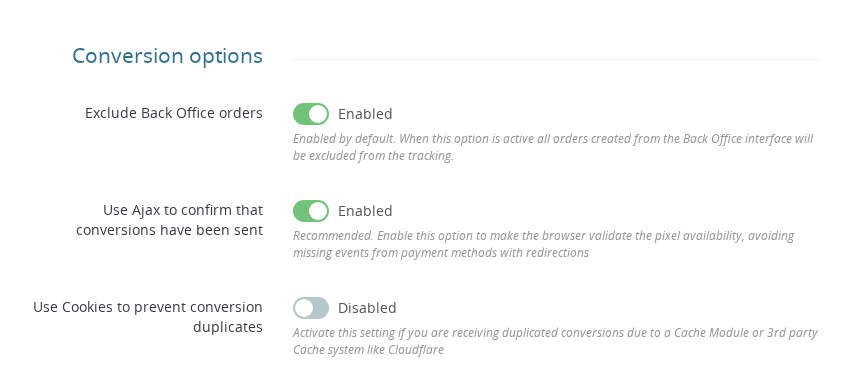
🍪 Use Cookies to prevent conversion duplicates
Config key: FCTP_COOKIE_CONTROL
Adds a browser-side check before firing the Purchase event. Pixel Plus sets a cookie named pp_purchaseSent with the order ID as the value. If that cookie already exists for the current order, the event is not sent again.
This protects against duplicate browser Pixel events when:
- The order confirmation page is reloaded
- Basic mode is enabled for a payment module
- A cache layer incorrectly serves the confirmation page from cache
The cookie check runs in both the hookActionValidateOrder and in ConversionApi::purchaseEventTrigger. There is no downside to enabling this — it only adds an extra safety check.
Cloudflare typically doesn't cache dynamic PHP pages. Unless you're using Enterprise-level full page caching, Cloudflare shouldn't affect Purchase event delivery. Cookie duplicate protection can still be enabled as an extra precaution.
💡 Examples
Card payment (standard flow)
The customer pays by card. The order is created and immediately reaches a logable (paid) status. Pixel Plus fires the CAPI Purchase event immediately and queues the browser Pixel event. When the customer lands on the confirmation page, the browser Pixel fires.
Bank transfer with "Track only validated orders" enabled
The customer selects bank transfer. The order is created as "Awaiting bank wire payment" (not logable). Pixel Plus stores the order in FCTP_ORDER_DELAYED_LIST along with the customer's browser context.
Three days later, the merchant confirms the payment and changes the status to "Payment accepted" (logable). Pixel Plus finds the order in the waiting list and sends the Purchase event via CAPI using the stored context.
Bank transfer with "Track only validated orders" disabled
The customer selects bank transfer. If "Awaiting bank wire payment" is not in the excluded states list, Pixel Plus tracks the order immediately — even before payment is confirmed.
Payment error
The customer tries to pay but the payment fails. The order receives a "Payment error" status. If this state is in the excluded list (or if validated-only is enabled), no Purchase event is sent.
Custom payment module not tracked correctly
A payment module uses a non-standard checkout flow and the Purchase event doesn't fire correctly. Enable Force basic mode for that specific module. Also enable Use Cookies to prevent conversion duplicates to prevent duplicate events on page reload.
Does 'Track only validated orders' mean only paid orders are sent?
Yes. Pixel Plus uses PrestaShop's logable flag on order states to determine whether an order is confirmed. Make sure your order states are correctly configured — states you consider paid should have logable = true in PrestaShop.
Can non-paid orders still be tracked?
Yes, in two cases: if 'Track only validated orders' is disabled and the order state is not in the excluded list, or if a deferred order (bank transfer, etc.) is later validated by the merchant within the allowed time limit.
Should I exclude unpaid states manually?
If 'Track only validated orders' is enabled, non-logable states are already blocked. Excluding clearly invalid states like Payment Error or Cancelled is still useful as an extra safety layer. If validated-only is disabled, you must manually exclude every state you don't want to track.
Should I enable cookie duplicate protection?
Yes, in most cases. It's especially recommended when basic mode is enabled for any payment module. It adds a secondary layer against duplicate browser Pixel events without any downside.
When should I enable Force basic mode for a payment module?
Only when that payment module is not being tracked correctly with the standard Pixel Plus logic. If you enable it, also enable Use Cookies to prevent conversion duplicates.
What happens if a deferred order isn't validated within the time limit?
Pixel Plus discards the pending entry and logs a warning in PrestaShop's log system. No Purchase event is sent for that order.
✅ Final Checklist
- Decide whether to track only validated orders or all orders — enable
FCTP_PURCHASE_VALID_ONLYaccordingly - Add invalid states (Payment Error, Cancelled, Refunded) to Order states to exclude
- Set the validation limit to match your typical payment confirmation window (default 7 days)
- Enable Use Cookies to prevent conversion duplicates (
FCTP_COOKIE_CONTROL) - Leave Force basic mode unchecked unless a specific payment module is not tracked correctly
- If enabling basic mode for any payment module, also enable cookie duplicate protection