Testing Facebook Pixel and CAPI Events Using Facebook Events Manager
The Test Events tool in Meta's Events Manager lets you verify that both browser (Pixel) and server-side (CAPI) events from your PrestaShop store are reaching Facebook. This is especially useful for events that don't always appear in Pixel Helper, like Initiate Checkout, Add Payment Info, and Purchase.
Step 1: Get the Test Event Code
- Log in to Meta Business Manager and open Events Manager.
- Select the Pixel ID used in your PrestaShop store.
- Go to the Test Events tab.
- Copy the test code (format:
TESTXXXXXXXXXX).
Note: This code is temporary and only works while the Test Events tool is open.
Step 2: Enable Test Mode in Pixel Plus
- Go to PrestaShop Back Office → Modules → Pixel Plus → Conversion API (CAPI) Settings.
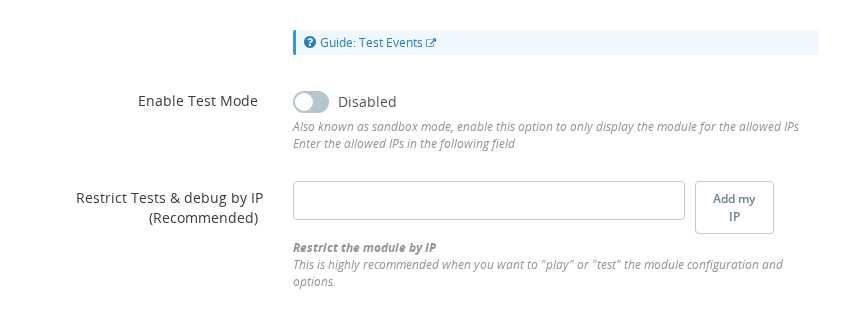
- Paste the Test Event Code into the "Test Code" field.
- Click "Add My IP" to restrict logging to your current IP — this prevents real customer actions from appearing in the log.
- Set "Enable Test Code Events" to Yes.
- Click Save.
Step 3: Trigger Events from Your Store
In Events Manager, click your store's URL to open it in a new tab linked to the test tool. Perform actions: view a product, add to cart, start checkout, and simulate a purchase.
Step 4: Analyze Events in Events Manager
- Browser events (Pixel) appear almost instantly.
- Server events (CAPI) take a few seconds to a minute.
Facebook groups matching browser and server events together for deduplication. Click any event to see:
- Event ID — links browser and server versions for deduplication
- User Data — hashed customer details
- Custom Parameters — product ID, price, category
Step 5: Confirm Events Come from Pixel Plus
Every event sent by Pixel Plus includes:
"event_trigger": "Pixel Plus"
If this field is missing, another module, manual fbq() calls, or a tag manager (GTM) may be sending events independently — which can cause duplicate tracking. See Detecting External Sources Sending Events.
Step 6: If No Server Events Appear
Work through this checklist:
- Test code is correctly pasted and "Enable Test Code Events" is set to Yes — and changes were saved.
- Your IP is correctly detected under "Restrict Tests & debug by IP".
- If you're behind a reverse proxy, load balancer, or Cloudflare, your real IP may not match. Temporarily disable IP restriction, run a quick test, then re-enable.
After correcting any settings, repeat your store actions and check again.
Remember to disable the test code option after testing to avoid false positives or misleading Facebook alerts.
What is the Test Events tool in Meta Events Manager used for?
It lets you verify that both browser Pixel and server-side CAPI events from your store are actually reaching Facebook. Events appear in real time, including event parameters, user data, and deduplication grouping.
How do I enable test mode in Pixel Plus?
Go to Pixel Plus CAPI Settings in your PrestaShop back office, paste the Test Event Code from Events Manager into the Test Events Code field, click Add My IP to restrict testing to your session, set Enable Test Code Events to Yes, and save.
Why is it important to disable the test code after testing?
Leaving the test code active without IP restriction can cause real customer events to appear in your test log and may generate misleading diagnostics or false alerts in your pixel settings. Always clear the Test Events Code field when testing is complete.
What should I do if server-side CAPI events do not appear in Events Manager?
If CAPI events are missing, check that your CAPI Access Token is valid and that your server can reach the Facebook API endpoint. Also verify the test code is correctly pasted and that Enable Test Code Events is saved as Yes.
How long does it take for CAPI events to appear in Events Manager?
Browser Pixel events appear almost instantly. Server-side CAPI events can take a few seconds to about a minute. If no events appear after several minutes, check that your test code is correctly entered and that Enable Test Code Events is saved as Yes.