Email Templates
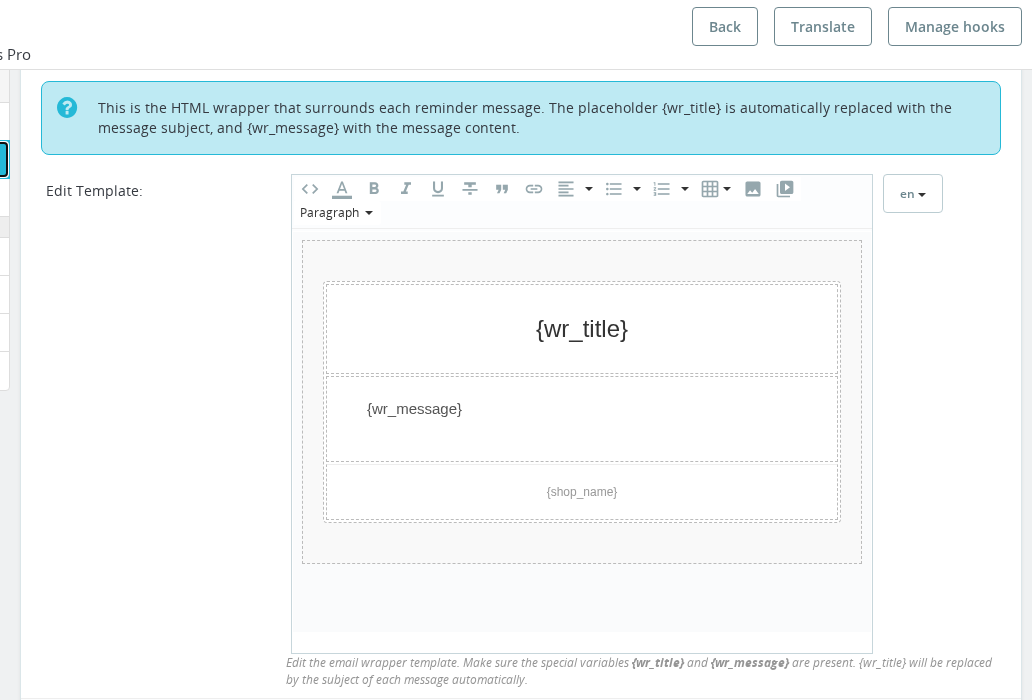
The module uses a two-layer email system: an HTML wrapper (the "Email Template") that provides the frame and branding, and individual message bodies you create for each reminder. Both layers support per-language editing and dynamic variables.
🎨 The Email Template (HTML Wrapper)
The Email Template section in the configuration page lets you edit the outer HTML that wraps every reminder email. It is initialized automatically from your current PrestaShop theme's contact.html email template, so it immediately matches your store's branding.
The wrapper must contain two special placeholders:
| Placeholder | Purpose |
|---|---|
{wr_title} | Replaced with the subject line of the individual message |
{wr_message} | Replaced with the HTML body of the individual message |
Do not remove these placeholders. If either is missing, the email will not render correctly.
The template editor uses per-language tabs (PrestaShop's standard HelperForm language tabs). Each installed language has its own copy of the wrapper. Edit the template for each language your store uses.
The plain-text version of each email is auto-generated from the HTML by stripping tags. You do not need to maintain a separate plain-text editor — the module handles it automatically.
📝 Message Subject and Body
The subject and body of each reminder are edited on the individual message form (via Add new Message or the Edit icon in the message list). Both fields have per-language tabs so you can write different copy in each language.
The body uses a rich-text (WYSIWYG) editor. Standard HTML is supported — use <p>, <strong>, <br>, and simple table elements. Avoid heavy multi-column CSS layouts as many email clients do not render them.
🔧 Available Template Variables
Use these variables in the subject or body of any reminder message. The module substitutes real order data when the email is sent.
| Variable | Available in | Description |
|---|---|---|
{shop_name} | Subject + Body | Your shop name |
{name} | Subject + Body | Customer first name |
{surname} | Subject + Body | Customer surname |
{completename} | Subject + Body | Customer full name (first + last) |
{reference} | Subject + Body | Order reference (e.g. BJKDM-21052) |
{totalamount} | Subject + Body | Order total formatted with currency |
{cancel_days} | Subject + Body | Total cancel days configured in Global Settings |
{daysleft} | Subject + Body | Days remaining before the order is cancelled |
{hoursleft} | Subject + Body | Hours remaining before the order is cancelled |
{date} | Subject + Body | Order creation date in d-m-Y format |
{date_us} | Subject + Body | Order creation date in Y-m-d format |
{date_english} | Subject + Body | Order date in ordinal English format (e.g. "3rd May 2025") |
{date_short} | Subject + Body | Short localized date using the order language |
{date_full} | Subject + Body | Full localized date using the order language |
{account_info} | Body only | Bank account owner name (from Custom Variables) |
{account_number} | Body only | Bank account number / IBAN (from Custom Variables) |
{bank_address} | Body only | Bank address (from Custom Variables) |
{order_products} | Body only | Order products as an HTML table |
{order_products_text} | Body only | Order products as plain text |
{urgency_banner} | Body only | Color-coded HTML countdown banner showing time remaining before cancellation |
{daysleft}, {hoursleft}, {cancel_days}, and {urgency_banner} only produce meaningful output when the Global Settings cancel feature is enabled and a cancel days value is configured. If cancellation is not configured, these variables will be empty or zero.
🏦 Configuring Bank Details Variables
The variables {account_info}, {account_number}, and {bank_address} are populated from the Custom Variables system (wr_variables database table). To set your bank details:
- On the configuration page, find the Custom Variables section (visible in the dashboard view).
- Add or edit the entries for
account_info,account_number, andbank_addresswith your actual bank details. - Save. These values are injected into every reminder email when the variables are used.
Variables can be set as static (a fixed text value you enter) or configuration (a value read from a PrestaShop configuration key). Static is the right choice for most stores.
Custom variables are per-shop in a multi-shop setup, so you can have different bank details for each shop.
💡 Example Message Body
Hello {name},

Your order <strong>{reference}</strong> placed on {date} is still awaiting payment.

Please transfer <strong>{totalamount}</strong> to:

<strong>Account holder:</strong> {account_info}<br>
<strong>Account number / IBAN:</strong> {account_number}<br>
<strong>Bank address:</strong> {bank_address}

Use your order reference <strong>{reference}</strong> as the payment description.

{urgency_banner}

Thank you,<br>
{shop_name}
✅ Final Checklist
- Email Template (HTML wrapper) saved for each active language
-
{wr_title}and{wr_message}placeholders are present in the template - Bank details set in the Custom Variables section (
account_info,account_number,bank_address) - Each reminder message has a subject and body filled in for every active language
-
{reference}included in every message so customers know which order to reference in their bank transfer description - Urgency variables (
{daysleft},{hoursleft},{urgency_banner}) only used when the cancel feature is configured
Does each installed language need its own email template?
Yes. The HTML wrapper (Email Template) has per-language tabs and each reminder message has per-language subject and body fields. Customers receive emails in the language of their order. Fill in all active languages to avoid blank emails.
Where do the bank details variables come from?
The variables account_info, account_number, and bank_address are populated from the Custom Variables section on the configuration page. Add your bank details there as static entries. They are injected into every email where the variables appear.
Is there a separate plain-text editor for the email body?
No. The plain-text version is generated automatically by stripping HTML tags from the body. You only need to maintain the HTML body.
What happens if I use daysleft or hoursleft but cancellation is not configured?
If the Global Settings cancel feature is disabled or no cancel days value is set, these variables will output empty or zero values. Only use them in messages where you have also configured the cancellation feature.
Can I use different bank account details per shop in a multi-shop setup?
Yes. Custom variables are stored per shop in the wr_variables table, so each shop can have its own values for account_info, account_number, and bank_address.