Email Variables and Auto-Injection
Injects estimated delivery dates into PrestaShop transactional emails — either automatically (zero template edits required) or as named variables you can place anywhere in your templates.
Overview
Every time an order email is sent, the module captures the stored delivery dates for that order and makes them available as template variables. These variables work in any PrestaShop email template: order confirmation, shipped, order changed, bank wire awaiting payment, and any custom templates.
Two complementary mechanisms cover different needs:
- Variable injection — 9 named variables available in all PS emails, sourced from the
ed_orderstable. Works on PS 1.6+. - Auto-injection — the module appends the full delivery block and JSON-LD microdata automatically after the email body for
order_conf,shipped, andorder_changedemails. PS 1.7+ only. No template editing required.
Both systems pull dates from the saved ed_orders record, not from a live recalculation. If no ED record exists for the order (e.g., a virtual product), variables are silently emptied.
Configuration
- Go to Modules > Module Manager > Estimated Delivery > Configure
- Navigate to the Section 5 — Orders tab
- Find the Emails — Order Related Emails subsection
| Field | Values | Default | Description |
|---|---|---|---|
| Auto-inject delivery info into emails | On / Off | Off | Appends the delivery block and structured data automatically to order_conf, shipped, and order_changed emails. PS 1.7+ only. |
| Add check mark to email subject | On / Off | Off | Prepends a ✓ icon to the subject line of the delivery-update email sent when dates change. |
| Date format | Dropdown of locale-formatted examples | Format 3 | Controls how dates are formatted in {estimateddelivery}, {ed_delivery_min}, {ed_delivery_max}, and {ed_delivery_range}. Does not affect the ISO variables. |
When Auto-inject is enabled, you do not need to add
{estimateddelivery}to your templates manually — the block is appended regardless of template content. Both methods can coexist without duplication because the hook appends after the template body, outside the layout table.
Email Template Variables
The following variables are injected into every PS email that has a resolvable order ID. They are available for use in any .html or .txt email template.
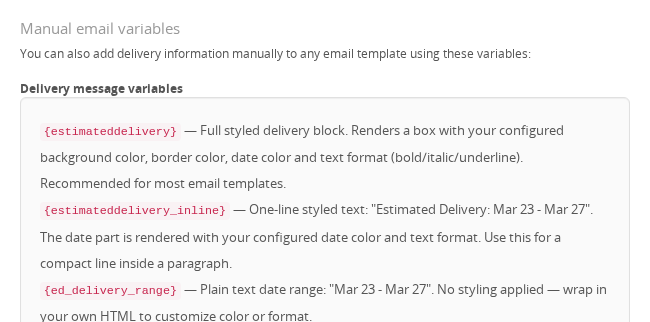
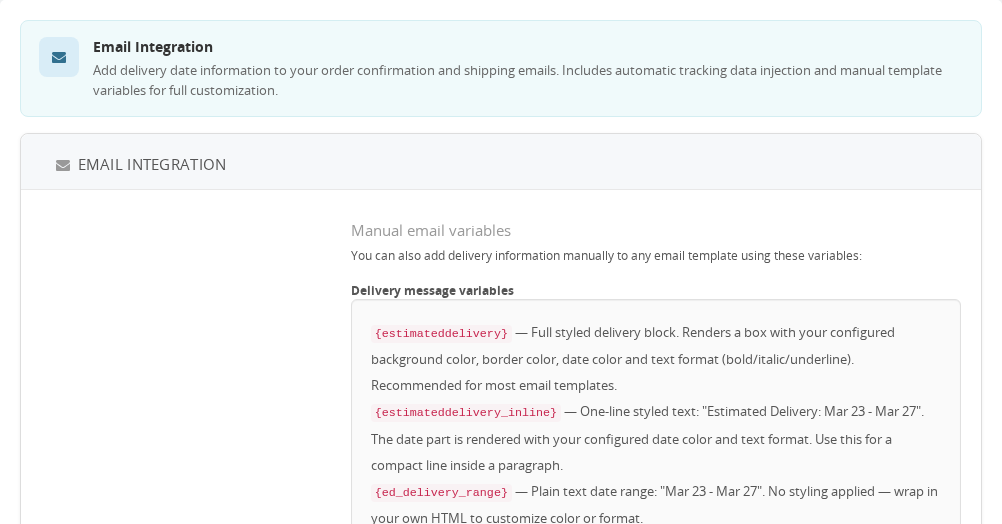
| Variable | Description | Example output |
|---|---|---|
{estimateddelivery} | Full styled HTML delivery block (matches the front-office box style) | HTML <div> with date and carrier info |
{estimateddelivery_inline} | One-line plain text with "Estimated Delivery:" prefix | Estimated Delivery: Mar 23 - Mar 27 |
{ed_delivery_range} | Date range only, no prefix. Single date if min = max | Mar 23 - Mar 27 or Mar 23 |
{ed_delivery_min} | Formatted minimum delivery date (uses the configured date format) | Mar 23 |
{ed_delivery_max} | Formatted maximum delivery date (uses the configured date format) | Mar 27 |
{ed_delivery_min_iso} | Minimum date in ISO 8601 format — locale-independent | 2026-03-23 |
{ed_delivery_max_iso} | Maximum date in ISO 8601 format — locale-independent | 2026-03-27 |
{ed_carrier_name} | Name of the carrier assigned to the order | Chronopost |
{ed_parcel_delivery} | Invisible <script type="application/ld+json"> block with ParcelDelivery structured data | JSON-LD tag (no visible output) |
Recommended templates: Add
{estimateddelivery}(or the inline/range variants) to thepaymentandshippedemail templates. The admin Back Office lists the templates under Design > Email Templates.
{ed_delivery_min_iso}and{ed_delivery_max_iso}are captured before locale formatting and always useYYYY-MM-DD. Use these for integrations, webhooks, or automations that need a machine-readable date.
How It Works
Variable Injection (PS 1.6+)
Two hooks cover all PS versions:
sendMailAlterTemplateVars— PS 1.6 hook, modifiestemplate_varsin-placeactionGetExtraMailTemplateVars— PS 1.7+ hook, adds toextra_template_vars
Both hooks call the same internal logic: locate the order from the template vars (via {id_order} or {order_name}), load the ed_orders record, format the dates, render the Smarty templates, and return the full variable set.
If the order cannot be located, all 9 variables are injected as empty strings so templates never display a broken {variable_name} placeholder.
Auto-Injection (PS 1.7+ only)
When Auto-inject is enabled, the actionEmailAddAfterContent hook fires for every outgoing email. It:
- Checks whether the template is one of:
order_conf,shipped,order_changed - Finds the order ID from the template vars
- Calls the same variable-resolution logic as the variable injection path
- Appends
{estimateddelivery}HTML + the JSON-LD<script>tag directly aftertemplateHtml
The appended block is outside the email layout table, which avoids breaking table-based email designs.
JSON-LD Microdata
{ed_parcel_delivery} emits a ParcelDelivery object conforming to schema.org. When recognized by Gmail or Outlook, this can show package delivery information in the mail client UI.
The structured data includes:
- Delivery address (name, street, city, postal code, country)
expectedArrivalFrom/expectedArrivalUntil— always in ISO 8601, not locale-formatted- Carrier name and organization
- All products in the order (name, URL, SKU, brand, image, color if available)
- Tracking number and tracking URL (order history page) when available
- Order number and shop name
Usage Examples
Example: Adding delivery dates to the order confirmation email
Open mails/en/order_conf.html in your theme. Find a suitable location — typically after the carrier information row — and add:
{estimateddelivery}
The full styled delivery box appears with the configured color scheme and date format.
Example: Adding a one-liner to a plain-text template
In mails/en/order_conf.txt, add a line after the order summary:
{estimateddelivery_inline}
Output: Estimated Delivery: Mar 23 - Mar 27
Example: Using ISO dates in a webhook or third-party automation
If your email platform (e.g., Klaviyo, Mailchimp) accepts raw template variables, use:
{ed_delivery_min_iso}
{ed_delivery_max_iso}
These always produce YYYY-MM-DD regardless of the shop language or date format setting.
Example: Zero-configuration setup with auto-injection
Enable Auto-inject delivery info into emails in Section 5 and save. The delivery block is appended to all order_conf, shipped, and order_changed emails automatically, with no template editing needed. Works immediately after enabling.
Important Notes
- Auto-injection is PS 1.7+ only. On PS 1.6, use the template variables manually.
- Variables require a saved ED order record. The module stores delivery dates in
ed_orderswhen the order is validated. If no record exists (virtual products, orders placed before the module was installed), all variables return empty strings — no errors or placeholders. - The
{delivery_min}and{delivery_max}variables (without theed_prefix) are used internally by the delivery-update notification email (ed_updatetemplate) that is sent when dates change. They are not part of the standard variable injection path for order confirmation emails. - Payment-pending notice: When an order uses a payment method that requires manual validation (bank wire, check), the styled delivery block includes an automatic disclaimer that the date may change until payment is confirmed.
- Multi-shop:
ED_EMAIL_AUTO_INJECT,ED_EMAIL_ICON, andED_EMAIL_DATE_FORMATare per-shop settings. - Individual dates per product: When the module is configured to track per-product delivery dates (ED_DATES_BY_PRODUCT), the
{estimateddelivery}block groups products by delivery date and lists them accordingly.
Troubleshooting
| Problem | Solution |
|---|---|
Variables appear literally as {estimateddelivery} in the email | The hook is not registered. Go to Modules > Module Manager > Estimated Delivery > check that the module is installed correctly. |
| Variables are empty in the email | The order has no ED record. Check ed_orders for the order ID. This is expected for virtual products or orders placed before module activation. |
| Auto-inject shows the block but dates are wrong | The ed_orders record has stale dates. If the order was placed long ago, the stored dates reflect the original calculation. |
| Auto-inject is enabled but nothing appears | This feature requires PS 1.7+. On PS 1.6, the actionEmailAddAfterContent hook does not exist. Use the template variables manually instead. |
{ed_parcel_delivery} renders visible text in some email clients | Some clients display inline script tags. This is an email client limitation. Place {ed_parcel_delivery} last in the template to minimize visual impact. |
| Delivery block color does not match the front-office color | The email block uses the same ed_class color config, but email clients strip many CSS rules. Inline styles are applied as a fallback. |
Technical Reference
-
Hooks used:
sendMailAlterTemplateVars— PS 1.6+; modifies$params['template_vars']to inject variablesactionGetExtraMailTemplateVars— PS 1.7+; adds to$params['extra_template_vars']actionEmailAddAfterContent— PS 1.7+; appends HTML to$params['templateHtml']fororder_conf,shipped,order_changed
-
Configuration keys:
ED_EMAIL_AUTO_INJECT— int (0/1), per-shop; enables the after-content hookED_EMAIL_ICON— int (0/1), per-shop; prepends ✓ to the delivery-update email subjectED_EMAIL_DATE_FORMAT— int (index 1–N), per-shop; controls locale date formatting for email variables (default: 3)
-
Database tables:
ed_orders— source ofdelivery_min,delivery_max,individual_dates,is_definitive,undefined_deliveryused for all email variable resolution
-
Key files:
estimateddelivery.php—hookSendMailAlterTemplateVars(),hookActionGetExtraMailTemplateVars(),hookActionEmailAddAfterContent(),addVariablesToEmails(),getExtraVarsFromOrderId()views/templates/front/emails/ed-email-template.tpl— Smarty template rendered into{estimateddelivery}views/templates/front/emails/parcel-microdata.tpl— JSON-LD schema.org block rendered into{ed_parcel_delivery}tests/phpunit/EmailVariablesTest.php— full PHPUnit test suite for variable values, ISO dates, microdata, and auto-injection behavior
Frequently Asked Questions
What happens if no delivery date was saved for an order?
All the variables resolve to empty strings, so the email is sent normally with no error and no leftover {placeholder} text. This can happen for orders placed before the module was configured, or when a product was excluded from the delivery calculation. The customer simply won't see a delivery date in that email.
Can I use these variables in custom email templates?
Yes. Any email template that PrestaShop sends through its standard mail pipeline gets these variables substituted. Add them to any .html or .txt file in your theme's mails folder — the module handles the replacement automatically.
If I change the date format in the module settings, are old emails affected?
No. The date format setting only applies to emails sent after the change. Emails that have already gone out are not modified — the dates in them are fixed at the moment they were sent.
Is it safe to include the parcel delivery JSON-LD variable in every email?
In most cases, yes. Email clients that don't understand structured data ignore the script block entirely, and Gmail and Outlook may use it to show a delivery tracking card. A few clients do render inline script tags as visible text, so place {ed_parcel_delivery} last in the template to keep any such fallback out of the way.
Do these variables work in multi-shop setups?
Yes. Each shop processes its own orders independently, and the variables read the delivery record belonging to that specific order. The auto-inject, subject icon, and date format settings are stored per shop, so you can configure each shop differently.
Related Features
- Cache System — delivery date calculations are cached; email variables always read from the
ed_orderssnapshot, not the live cache